

VS.T59B_V4.3 SOFTWARE FIRMWARE FREE DOWNLOAD
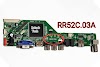
VS.T59B_V4.3 is a simple LED/LCD TV Card/Board. This TV card supported more than 26-inch LED/LCD panels. It supports full High Definition ( HD )Resolution 1920×1080. Its USB interface supports Software Upgrades and Multimedia Playback. VS.T59B_V4.3 is the only ATV card Main power supply and is required for this. VS.T59B-_4.3 software firmware is given below for technicians' support.
General Basic Specifications:
Model NO: VS.T59B_V4.3
Chipset: (TSUMV59XU)
TV System: SECAM/PAL/NTSC
Panel Interface: Dual-channel, Single-channel LVDS
Multi-Language: Yes
Voltage for Panel: DC+3.3V, DC+5V, DC+12V (Adjust able with jumping cap setting)
Input Working Voltage: DC+12 Volt
IR Control: Yes
USB Port Supported: Software Upgrade and Multimedia Playback

Key Button Functions:
CH-/CH+/MENU/VOL-/VOL+Souce/Power
Input Output Ports in VS.T59B_V4.3:
HDMI: High-Definition Multimedia Interface
VGA: Video Graphics Array
AV: Audio-Visual or Audio Video
USB: Universal Serial Bus
RF TV interface
Earphone Out
Factory Service Mode:
Input/Source+2008, Menu 1147
For video tutorials, visit our YouTube channel ZAINABTECH and Facebook page ZAINABTECH92.
How to install Firmware:
Format the USB Drive into FAT32
Copy the Required Resolution software/Firmware into the USB Drive
Connect the USB to the Mainboard
Power ON the Supply.
LED IR starts blinking
Wait and watch the LED IR indicator stop blinking.
When the stop program is upgraded.
Power off the supply and remove the USB drive
Disclaimer Note:
The following software/firmware files of VS.T59B_V4.3 are backup dump files. Team ZainabTech is not responsible for any type of loss/damage as a result of installing/uploading/downloading the software/firmware. If you are new in this field and do not have enough knowledge of installing SW/FW or dump files, then do not do this. And if you do this work, make sure that you know complete information about repairing LCD and LED TVs.
VS.T59B_V4.3 SOFTWARE FIRMWARE DOWNLOAD


0 Comments